Setting Up a Portable Library with ZotFile
Lee Hachadoorian on Dec 14th 2013
For the last two years, I have used a combination of calibre and Zotero to manage my research sources, mostly PDFs of journal articles. Zotero is great for reference management and automatic citation. I force my first-year seminar students to use it for their research papers, and even upper division students who have not used a reference manager before have their minds blown when they realize they no longer need to keep track of where the commas go in a citation. Enough people love Zotero that I hardly need to sing its praises. But I don’t like its obtuse, iTunes-like management of your library in a hierarchy of meaninglessly named subfolders, and I also wanted something that could sync my library to my Kindle DX.
I started using calibre, which is primarily intended as an e-reader manager, for that reason, and also for the fact that it allows easy conversion to e-reader file formats from HTML, DOC(X), and also from EPUB (which the Kindle can’t read) to MOBI (which it can). (It does offer PDF conversion as well, but I found the results to be not very good, so I read native PDFs on the Kindle.) Additionally, while calibre also does not give you control over the library folder hierarchy and file naming, it at least uses a human-readable hierarchy based on <author(s)>/<article name>/<article name>.<extension>. (Article name is duplicated in the folder hierarchy and the file name because multiple formats of the article, such as PDF and EPUB, may coexist in the folder.) This meant that when I found a journal article I wanted to read, I had to import it to calibre, import the bibliographic data to Zotero, and link from the Zotero database to the file in the calibre storage hierachy. While no single step is difficult in and of itself, doing three things instead of one always inspires a certain amount of laziness, so it meant that my libraries often got out of sync. In practice this usually meant that I had the article to read on my Kindle, but not in Zotero. Additionally, time I spent updating metadata in calibre had limited payoff because I couldn’t use calibre for citation.
Since nothing sidetracks writing a paper like finding out your sources aren’t in order, I’ve decided it’s more important to prioritize the reference manager, and want to use Zotero to manage my library. Fortunately, Zotero has some ways to add these desired features, including the ZotFile plugin for library management (which has been around for awhile, but since I was managing my library in calibre, I haven’t used ZotFile until now). ZotFile lets you specify an alternate location to store your attached files, and gives you control over the folder hierarchy and file naming (similar to Mendeley, or to many music players; note, calibre also gives you this kind of control, but you have to export your library to an alternate location, duplicating all your files–it doesn’t allow you to mess with its internal library structure). The instructions for doing this on the developer’s web page were a little unclear to me, so I went looking for help in the Zotero forums, and found a thread from today started by a new user who was looking for guidance in how to do the same thing. In this post, I’ll explain how to accomplish this.
First, you have to understand that Zotero draws a distinction between saving a file internally (which it calls “stored” files), and saving a link to a file anywhere on your hard drive, though both stored and linked files are called “attachments”. Part of the reason why its internal naming is so obtuse is probably because they don’t want you messing with it and moving files around. If you want a pretty, human-readable hierarchy, you need to tell ZotFile how to construct that hierarchy. Since linked files can be anywhere on your hard drive, by default Zotero saves their location using absolute paths. If you want to share your files across computers, you need to instead tell Zotero to interpret all file paths relative to your human-readable hierarchy.
- Go to Zotero Preferences (using File→Preferences, or using the gear icon). Click the Advanced icon at the top, then the Files and Folders tab.
- Under Linked Attachment Base Directory, hit the Choose button and use the file browser to pick the folder where you want your library to be organized:
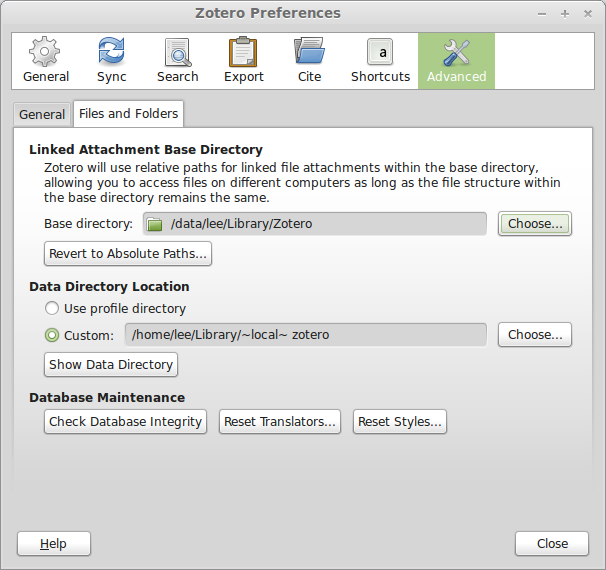
NOTE: You do not have to change the Data Directory Location. This is the location of your Zotero database, and also where PDFs are stored internally, but the whole point of what we are doing is to not store the files internally. - Now go to ZotFile (not Zotero) Preferences, by clicking the gear icon, and go to General Settings.
- Under Location of Files, click Custom Location, and set it to the same folder you just set as the Linked Attachment Base Directory.
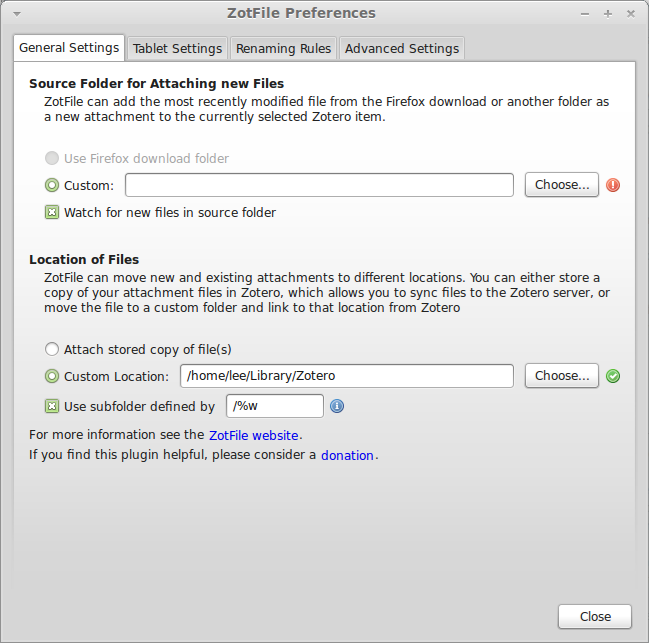
- Check “Use subfolder defined by”. The default, `/%w/%y`, will organize your files into directories by journal/publisher (uses the publisher name if there is no journal name, e.g. for books) and year. Since I want to be able to navigate this directory sensibly, and I can’t always remember the year a paper was written, I dropped year from the definition. The codes used here and in the next stop are listed in detail at the ZotFile website.
- Click the Renaming Rules tab. Leave “Use Zotero to rename” unchecked. The default naming rule is `{%a_}{%y_}{%t}` which would generate something like “Smith_2013_This is my title.pdf”. I don’t like underscores in my filenames, so I set my renaming rule to `{%a }{%y – }{%t}`, which would produce “Smith 2013 – This is my title.pdf”, and changed the delimiter between multiple authors to an ampersand surrounded by spaces. Others might prefer a comma. If the filesystem can handle long names, I don’t see why I shouldn’t take advantage of that, so I unchecked both “Truncate title after . or : or ?” and “Maximum length of title”. I left the maximum number of authors at 2, and the use of “et al” for more than two authors.
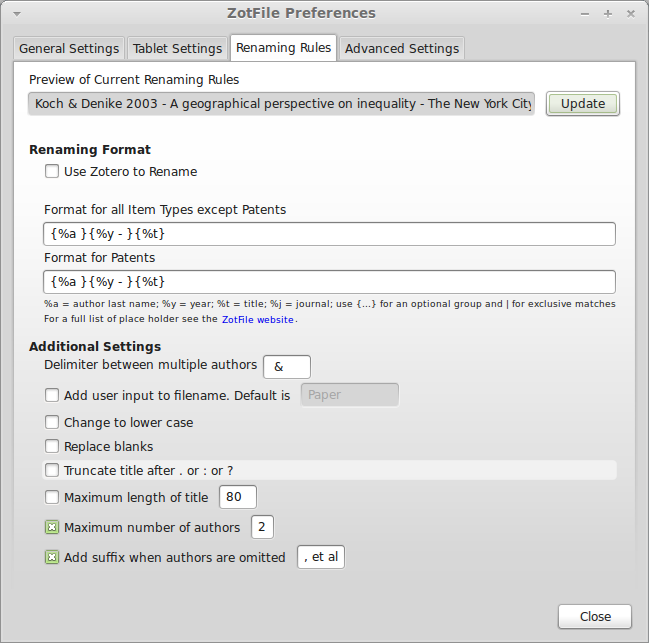
- At this point you can select an item in the main Zotero window and click the Update button at the top of the dialog to see how the file will be renamed. If you are satisfied with it, hit the Close button.
- Now we want to actually move our attached files to this new hierarchy. I began by sorting my library on the attachments column (just click on the paper clip at the top of the column). Then Shift+Click to select all the items with attachments. Right-click on the selected files and choose Manage Attachments→Rename Attachments. ZotFile will now move the files to the Location of Files specified in the preferences. It will do this for both attachments, like the files in my calibre library, and Zotero’s own internally stored files, which will become attachments in the new location, and no longer be stored internally. But this will not move web page snapshots, which stay internal.
Do keep in mind that ZotFile does not copy the files, it moves them. Since my attached files were in my calibre library, and I’m not giving up on calibre just yet, I didn’t really want them deleted from their original location. I backed up my calibre library so that I could allow ZotFile to move the files to the new location, then restored my calibre library from the backup. But I kept the backup for the next step. Since I had a lot of sources in the Zotero database (hundreds) that were not linked to the PDFs in calibre, I could link to the PDFs in this backup, then move them with Manage Attachments→Rename Attachments without affecting my calibre library.
Storing the files this way has two advantages over storing them internally. First, since they are in a human-readable hierarchy, I can pretty quickly find a file through the file browser of another application—for example, if I am writing an email to a colleague and want to attach an article— without having to switch to Zotero first. Second, although Zotero supports WebDAV for library syncing, and Zotero’s own storage is not that expensive, using ZotFile to organize your attachments this way allows you to use any cloud service to keep your library synced across computers, such as Dropbox (mentioned by the new user who started the forum thread linked above) or SpiderOak (my preferred backup/share/sync service).
I ran into a little bit of an issue in that I use Zotero Standalone. This requires me to also have Zotero for Firefox installed so that I can import sources while web browsing. But the preferences did not propagate between them (for either Zotero or ZotFile), so I had to independently set the Linked Attachment Base Directory, Location of Files, and Renaming Rules in both Standalone and the Firefox plugin.
While I’m pretty happy with the result, this all leaves calibre and Kindle syncing out of the equation. Using external PDF reader applications, ZotFile can also manage syncing PDFs, including annotations, between your Zotero library and iPad or Android tablets. Maybe there’s a way to get this to work with calibre to keep my library synced with my Kindle? That will be the next thing to figure out…
Thanks to Zotero forum users bwiernik and adamsmith.
Filed in Productivity | 3 responses so far